
Inclusive Events
Authored by:
iClick2Learn Team
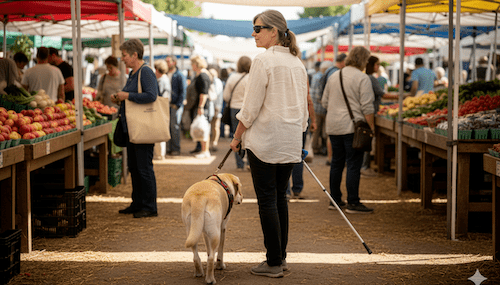
Table of Contents
1. Overall Enjoyment
One of the first things an attendee thinks about is the overall enjoyment the atendee will get.
- Is it an event that relies heavily on visual information, like a foreign film with non-audio-described subtitles? If so, the enjoyment factor is low.
- If it’s live music or an event where the audio component is the main focus, the experience is much more accessible.
Transport is another big factor, especially for events that run late.
- How will they get there and, more importantly, how will they get home safely?
- Waiting in a dark, isolated area for a taxi or ride-share is a safety concern.
- The availability of accessible, well-lit public transport is a huge bonus.
Making Space for Assistance Dogs
When bringing an assistance dog, event organisers can make a big difference by considering the environment.
- Crowd Navigation: Will the attendee have to navigate poorly lit, heavy crowds, increasing the risk of the assistance dog being accidentally trampled?
- Designated Seating: Can the attendee get specially allocated seating with a little extra space? This allows the assistance dog to sit safely away from heavy foot traffic.
- Toileting Areas: Where can the assistance dog be taken to relieve itself? An easily accessible, well-lit patch of grass nearby is essential.
Many attendees find it helpful to look at a venue map before they go. This allows them to mentally prepare for the layout and pick out landmarks, just in case they get lost.
Three Great Tips for Event Organisers If you're an event organiser, here are three simple ways you can make your next event significantly more accessible.
2. Ensure Your Pre-Event Information is Accessible
The information you send out before the event needs to be consumable by everyone.
- Make sure your digital info is compatible with screen readers.
- Offer large print with high contrast for people with vision impairments.
- Any promotional videos should include captions for those who are hearing impaired.
3. Appoint an Accessibility Point Person
Having one dedicated contact person is invaluable.
- This person, along with a phone number or email address, should be available prior to the event. An attendee could call to ask about things like a dog toileting area or request extra seating space.
- Crucially, have someone available on the day to help with any immediate assistance needed.
- Make sure your volunteers and assistance people are easy to spot. Let people know, “Look for the person in the orange hat, or the yellow t-shirt with ‘Volunteer’ written on it.”
4. Prepare Presenters for an Inclusive Audience
One of the most common problems is when presenters assume everyone can see and hear them perfectly.
- If there are people who are vision or hearing impaired, they often can’t see the screen or hear the speaker clearly.
- Prepare your presenters to provide audio descriptions for what’s on the screen.
- Consider setting up a hearing loop so hearing-impaired people can clearly hear the presentation.
Summary
Creating inclusive events doesn’t have to be complicated! By focusing on accessible pre-event communication, providing practical support for attendees with assistance dogs, and ensuring your presentations accommodate both vision and hearing impairments, you can guarantee a fantastic and welcoming experience for everyone. Thank you for your interest in building more inclusive events—it makes a real difference!
- Tags | Accessibility, Event, Event Promotion, Events, Run Events